

Close Menu

    Subscribe to Updates

    Get the latest creative news from FooBar about art, design and business.

    What's Hot

    Zoho Projects: Key Features and Overview

    October 27, 2025

    Zoho CRM Comprehensive Overview

    October 27, 2025

    Zoho Desk: Guide and Comparison

    October 27, 2025
    Facebook X (Twitter) Instagram
    Tech How To DoTech How To Do
    • Tech News
    • Home
    • Windows
      • Windows Server
    • Apple
    • Linux
    • WWW
      • E-commerce
      • Shopfiy
    • Mobile
      • Android
      • iOS
    • Cloud
    • Office
    • Tech Tips
    • Gaming
    • HRMS
      • Admin
      • Employee
    Tech How To DoTech How To Do
    Home»HRMS»Admin»Add an Announcement in HRMS
    Admin

    Add an Announcement in HRMS

    Dure ShehwarBy Dure ShehwarMarch 3, 2025Updated:October 27, 2025No Comments3 Mins Read
    Facebook Twitter Pinterest Telegram LinkedIn Tumblr WhatsApp Email
    Company Announcements in HRMS
    Share
    Facebook Twitter LinkedIn Pinterest Telegram Email

    In today’s fast-paced corporate environment, effective communication is key to keeping employees informed. An efficient Human Resource Management System (HRMS) allows organizations to manage company announcements in HRMS seamlessly. HR teams can add an announcement in HRMS to ensure important updates reach employees quickly and efficiently. Whether it’s policy changes, event notifications, or general updates, HRMS simplifies the process of posting and managing announcements.

    This guide will walk you through the steps to add an announcement in HRMS, ensuring timely communication within your organization.

    Logging into HRMS

    To begin, open the HRMS portal and log in using your unique credentials. Make sure you have your username and password handy. Logging in grants you access to the dashboard, where you can create and manage announcements.

    Navigating to the “Announcements” Section

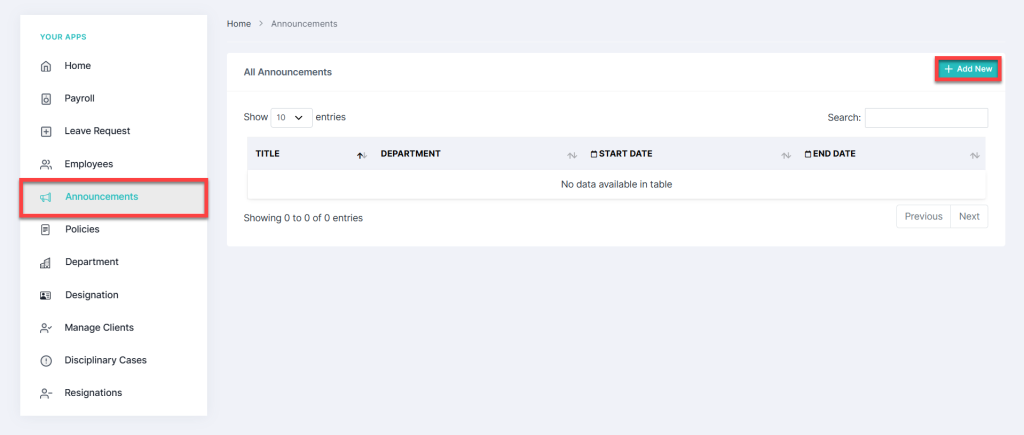
    Once logged in, navigate to the “Announcements” tab. This section serves as the central hub for managing company-wide announcements. Here, you can view, edit, and add new announcements.

    Steps to Add an Announcement in HRMS

    To create an announcement, follow these steps:

    1. Click on the “Add New” button located at the top right corner.
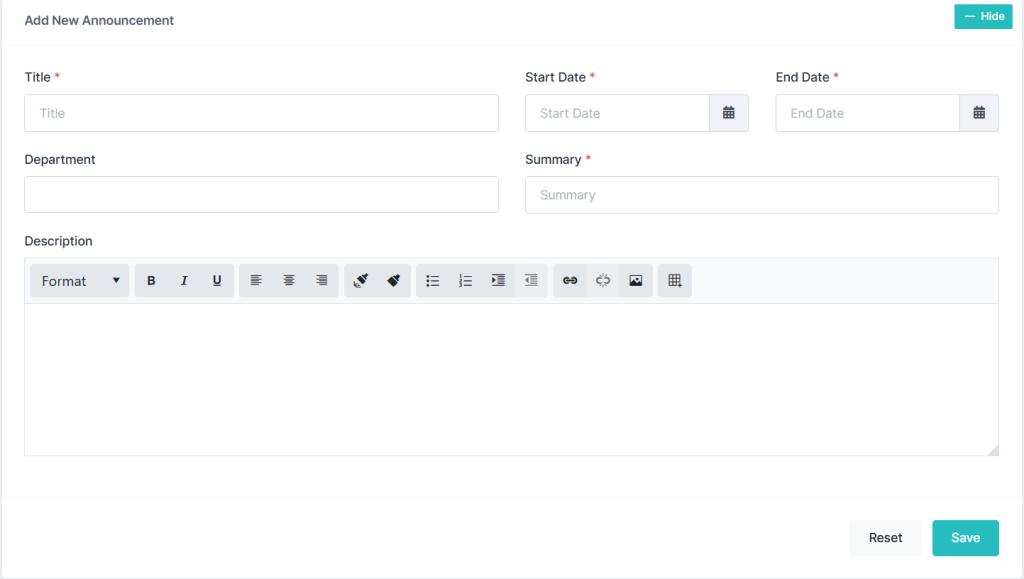
    2. A new form will appear, prompting you to enter announcement details.Company Announcements in HRMS

    Entering Announcement Details in HRMS

    When adding an announcement, you will need to provide the following details:

    • Title: Enter a concise and clear title for the announcement.
    • Start Date & End Date: Click on the date fields, and a calendar will pop up. Select the desired duration for the announcement.
    • Department: Choose the department(s) for which the announcement is relevant.
    • Summary & Description:
      • Add a brief summary for quick reference.
      • Provide a detailed description using the text editor, which includes formatting options like bold, italic, underline, hyperlinks, images, and bullet points.Add an Announcement in HRMS

    Saving or Resetting an Announcement in HRMS

    Once all details are entered:

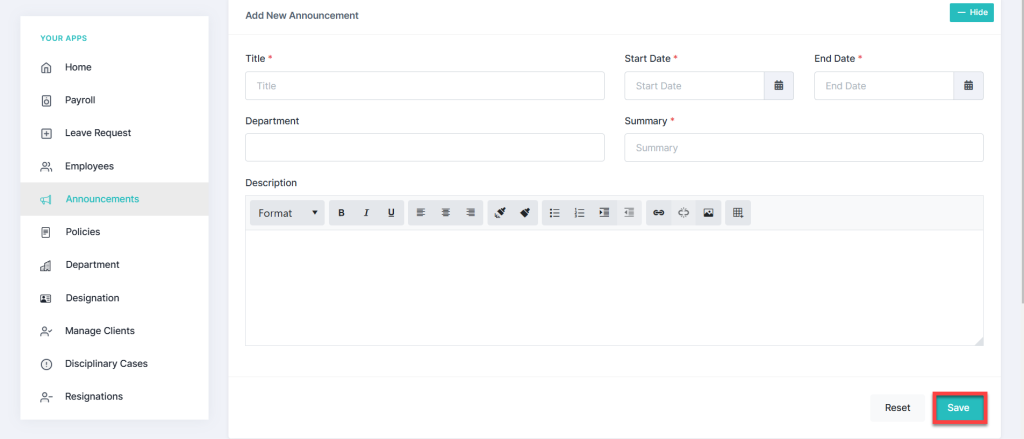
    • Click the “Save” button (bottom left corner) to publish the announcement.
    • If needed, click “Reset” to clear the form and start over.Add an Announcement in HRMS

    Viewing & Searching Announcements

    After saving, the announcement will appear in the list of announcements. To find a specific announcement:

    • Use the Search Bar at the top right corner.
    • Filter announcements by date, department, or keywords.

    Conclusion

    Adding an announcement in HRMS is a simple yet essential process for ensuring smooth internal communication. By following these steps, you can efficiently share updates with relevant employees. Make it a practice to review and update announcements regularly to keep your workforce informed and engaged. For any further assistance, feel free to contact us.

    Company Updates HRMS Announcements HRMS Guide HRMS Tutorial
    Share. Facebook Twitter Pinterest LinkedIn Tumblr Email
    Dure Shehwar
    • Website

    Related Posts

    HRMS Assets Module: Features, Management, and User Guide

    September 6, 2025

    Generate Employee Reports in HRMS

    March 13, 2025

    How to Process Payroll in HRMS

    March 6, 2025

    How to Exit an Employee in HRMS

    March 5, 2025

    How to Add an Employee in HRMS

    March 5, 2025

    Add a Disciplinary Case in HRMS

    March 3, 2025

    Comments are closed.

    Recent Posts
    • Zoho Projects: Key Features and Overview
    • Zoho CRM Comprehensive Overview
    • Zoho Desk: Guide and Comparison
    • Change your SharePoint domain name
    • HRMS Assets Module: Features, Management, and User Guide
    Categories
    • Android
    • Apple
    • Beauty
    • Building
    • Business
    • Construction
    • Design
    • Education
    • Fashion
    • Food
    • Games
    • Health
    • Lifestyle
    • Mobile
    • Nature
    • News
    • Photo
    • Politics
    • Sports
    • Tech News
    • Tech Tips
    • Technology
    • Travel
    • Video
    Tags
    Business Case Study Creative Education Global Insights Market Security SEO Marketing Smartphone Solutions VPN
    © 2026 Tech How To Do. Develop, Designed and Maintained by AIIT SOLUTION
    • Home
    • Tech
    • Gadgets
    • Mobiles
    • Buy Now

    Type above and press Enter to search. Press Esc to cancel.

    Ad Blocker Enabled!
    Ad Blocker Enabled!